# Giao diện trang iframe
> Áp dụng cho `api_version: "2026-01"`, gói `@pancake-pos/ui` từ bản 2026.1.11.
Trang iframe (`app.page` có `render: "iframe"`) là ứng dụng web tự do: dùng được React, router, thư viện bất kỳ. Để trang nhìn và dùng như các màn hình khác của POS, gói `@pancake-pos/ui` có:
- **Component cùng bộ với Worker UI:** mỗi element `pos-*` trong [Component giao diện](/developers/apps/components) có component React cùng tên viết hoa (`pos-table` → `PosTable`), cùng thuộc tính và sự kiện. POS cũng vẽ element của Worker UI bằng chính các component này, nên hai kiểu trang giống nhau tới từng điểm ảnh.
- **`PosProvider`:** kết nối POS, áp theme antd, font Inter, ngôn ngữ của người dùng, đưa tiêu đề và nút của trang lên dòng tiêu đề của POS, bỏ thẻ trắng để trang nằm trên nền xám như trang của POS.
- **Token:** màu, chữ, khoảng cách của POS dạng JS, biến CSS và preset Tailwind cho phần tự vẽ.
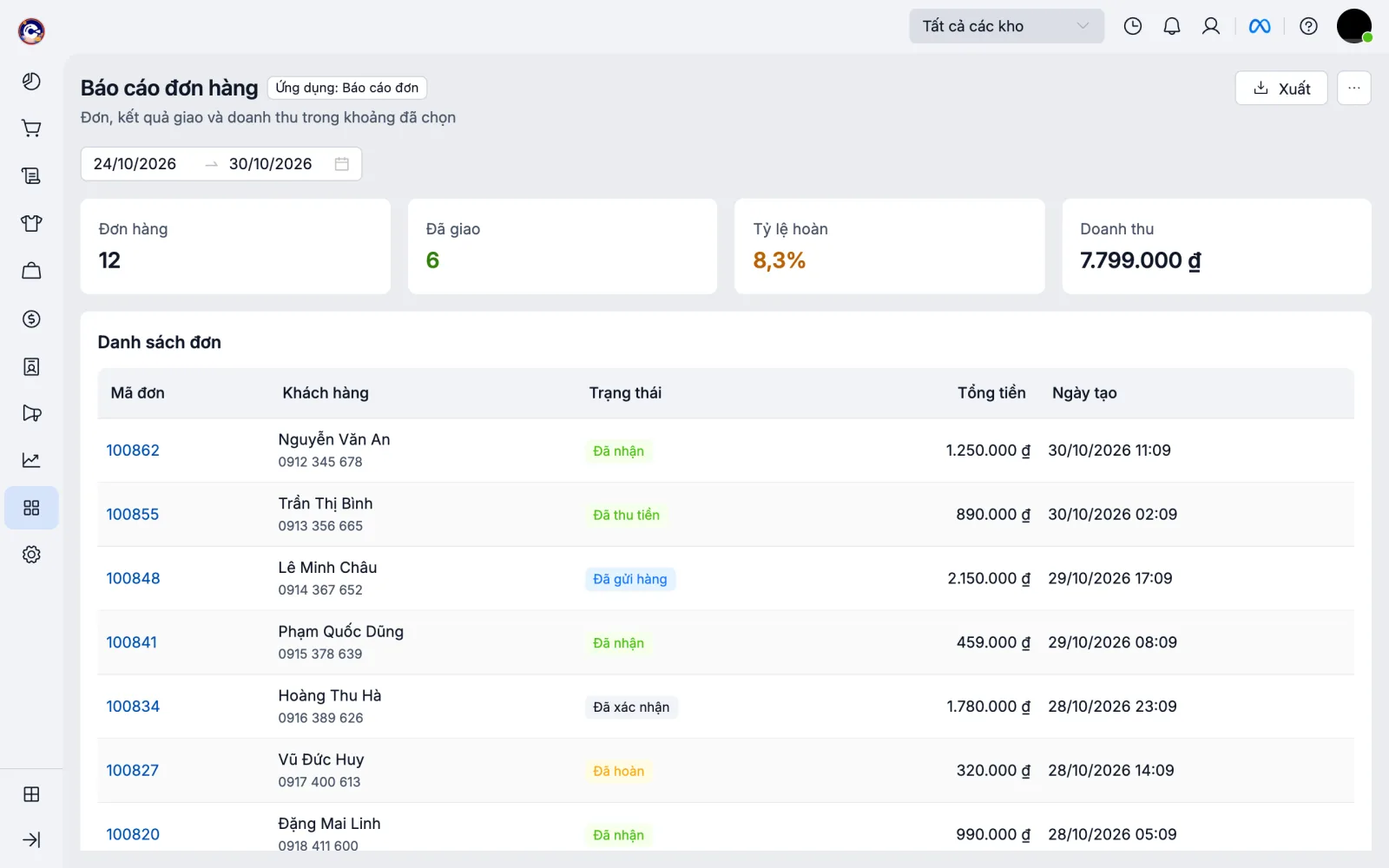
Ảnh trên là ví dụ `iframe-report` (lệnh `get_example` của [MCP](/developers/apps/ai-guide#mcp)) với dữ liệu mẫu.
## Cài đặt
Dự án tạo bằng `create-pos-app` đã có sẵn. Thêm vào dự án có sẵn:
```bash
npm install @pancake-pos/ui @pancake-pos/ui-extensions antd react react-dom
npm install recharts@2 # chỉ khi dùng PosChart
```
## PosProvider
Bọc cả trang trong `PosProvider`, lấy `pos` bằng `usePos()`:
```tsx
import { useState } from 'react';
import { createRoot } from 'react-dom/client';
import { PosFilterBar, PosPage, PosProvider, PosSection, PosTable, PosTextField, PosButton, usePos } from '@pancake-pos/ui';
function App() {
const pos = usePos();
const [search, setSearch] = useState('');
return (
Xuất}>
setSearch(event.detail)} />
);
}
createRoot(document.getElementById('root')!).render(
,
);
```
| Thuộc tính | Mặc định | Ý nghĩa |
|---|---|---|
| `frame` | `'plain'` | `plain`: POS bỏ thẻ trắng quanh iframe, trang vẽ trên nền xám, `PosSection` là thẻ trắng. `card`: giữ thẻ trắng, khối có viền |
| `standalone` | không | Trang tự host mở được cả ngoài POS: `true` hoặc `{ locale, currency }` cho ngôn ngữ, tiền tệ khi ngoài POS |
| `font` | `true` | Nạp font Inter kèm gói (không tải từ Google Fonts, vì CSP của sandbox chặn font ngoài) |
| `timeout` | 10 giây | Thời gian chờ POS |
| `fallback` | `Spin` | Hiện trong lúc chờ POS |
- `usePos()` trả `pos` như [Runtime API](/developers/apps/runtime-api); ngoài `PosProvider` hoặc ngoài POS thì ném lỗi. `usePosOptional()` trả `null` thay vì lỗi.
- `PosPage` đưa `heading`, `description` và nút trong `actions` (`PosButton`, `PosMenuButton`) lên dòng tiêu đề của POS qua [`pos.page.setHeader`](/developers/apps/runtime-api#trang-iframe); bấm nút gọi đúng `onClick`/`onSelect` của nút trong trang. Nút cần chữ thuần hoặc `icon`; con khác trong `actions` không lên được dòng tiêu đề (console cảnh báo). Trang không dùng `PosPage` tự gọi `pos.page.setHeader` được, `PosProvider` không ghi đè.
- Ngôn ngữ của antd (DatePicker, Table, Pagination…) theo ngôn ngữ người dùng: vi, en, th, id, es, pt, lo.
- App đã build bằng SDK trước 2026.1.11 giữ nguyên khung trắng và tiêu đề cũ. Lên SDK mới thì trang chuyển sang nền xám; trang đang tự vẽ nền trắng toàn trang dùng `` để giữ như cũ. Mở trên bản POS chưa hỗ trợ dòng tiêu đề (POS cũ), `PosPage` tự vẽ tiêu đề và nút trong trang, trang giữ thẻ trắng.
## Component
Viết như element `pos-*` của Worker UI, đổi tên thẻ:
| Worker UI | Trang iframe |
|---|---|
| `` | `` |
| Sự kiện `onChange={(e) => set(e.detail)}` | Giống hệt: `onChange={(e) => set(e.detail)}` |
| Slot: `Xuất` | Thuộc tính: `actions={Xuất}` (`footer` của `PosModal`, `PosDrawer` cũng vậy) |
| Biến toàn cục `pos` | `const pos = usePos()` |
| `element.focus()` qua `ref` | `ref` trỏ vào phần tử DOM của component |
Thuộc tính, giá trị enum, giới hạn xem từng element trong [Component giao diện](/developers/apps/components). Component nhận `value`/`checked`/`selected` từ state của bạn (controlled); bỏ trống thì component tự giữ giá trị.
| Nhóm | Component |
|---|---|
| Bố cục | `PosStack`, `PosGrid`, `PosSection`, `PosDivider` |
| Hiển thị | `PosText`, `PosHeading`, `PosBadge`, `PosMoney`, `PosLink`, `PosImage`, `PosDescriptionList`, `PosTimeline` |
| Nhập liệu | `PosTextField`, `PosNumberField`, `PosSelect`, `PosCheckbox`, `PosDatePicker`, `PosTimePicker`, `PosDateRange`, `PosSwitch`, `PosRadioGroup`, `PosFileInput` |
| Phản hồi | `PosBanner`, `PosSpinner`, `PosProgress`, `PosEmpty` |
| Dữ liệu và thao tác | `PosButton`, `PosMenuButton`, `PosTable`, `PosModal`, `PosDrawer` |
| Trang | `PosPage`, `PosTabs`, `PosFilterBar`, `PosStat`, `PosChart` |
- `PosChart` nằm ở `@pancake-pos/ui/chart` và cần `recharts`: `import { PosChart } from '@pancake-pos/ui/chart'`.
- `PosMoney`, cột `format: 'money'`, `PosStat format="money"` định dạng theo tiền tệ và quy tắc của shop như màn hình POS; không tự định dạng bằng `toLocaleString`.
- Vẫn dùng được component antd khác (`Tree`, `Steps`…): `PosProvider` đã áp theme của POS.
## Modal và drawer phủ cả POS
Trang iframe mở modal, drawer theo hai cách:
| | `PosModal`, `PosDrawer` | `pos.ui.modal`, `pos.ui.drawer` |
|---|---|---|
| Nội dung | Vẽ trong trang, dùng state của trang | Một trang iframe khác của app, nhận `path`, `query`, trả kết quả qua `pos.close(result)` |
| Cỡ | Cao, rộng tối đa bằng iframe; POS làm mờ phần ngoài iframe | Modal, drawer của POS, cao hết màn hình |
| Mở từ | Trang iframe | Block, action, trang |
| Hợp với | Hộp xác nhận, form ngắn | Panel chi tiết, form rộng |
### PosModal, PosDrawer
Modal, drawer vẽ trong iframe chỉ phủ được iframe. Khi `PosModal`, `PosDrawer` mở, POS làm mờ dòng tiêu đề, menu và thanh trên quanh iframe như khi POS tự mở modal ([`pos.page.setBackdrop`](/developers/apps/runtime-api#trang-iframe)). Bấm vùng mờ hay nhấn Esc gọi `onClose` của lớp mở sau cùng, như bấm nền mờ trong trang.
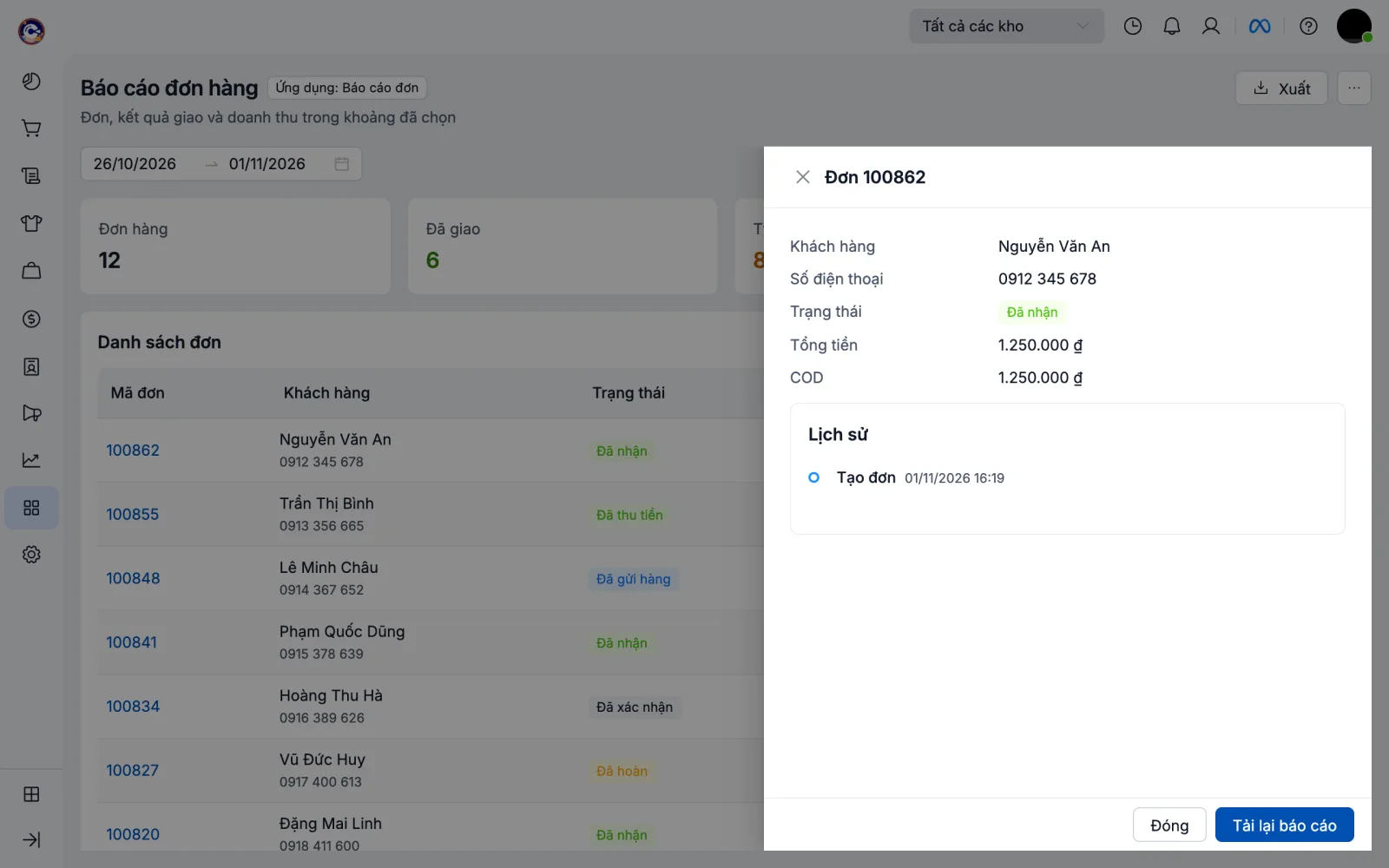
`Modal`, `Drawer` của antd hay thư viện khác thì gọi `usePosBackdrop` để POS làm mờ như vậy:
```tsx
import { Drawer } from 'antd';
import { usePosBackdrop } from '@pancake-pos/ui';
function Detail({ open, onClose }: { open: boolean; onClose: () => void }) {
usePosBackdrop(open, onClose);
return …;
}
```
Cần gói từ bản 2026.1.12 và bản POS có lệnh này; POS cũ chỉ làm mờ trong iframe như trước.
### pos.ui.modal, pos.ui.drawer
Modal, drawer của POS (cao hết màn hình, mở được cả từ block, action) mở một trang iframe của app bằng [`pos.ui.modal`/`drawer`](/developers/apps/runtime-api#pos-ui-modal-pos-ui-drawer):
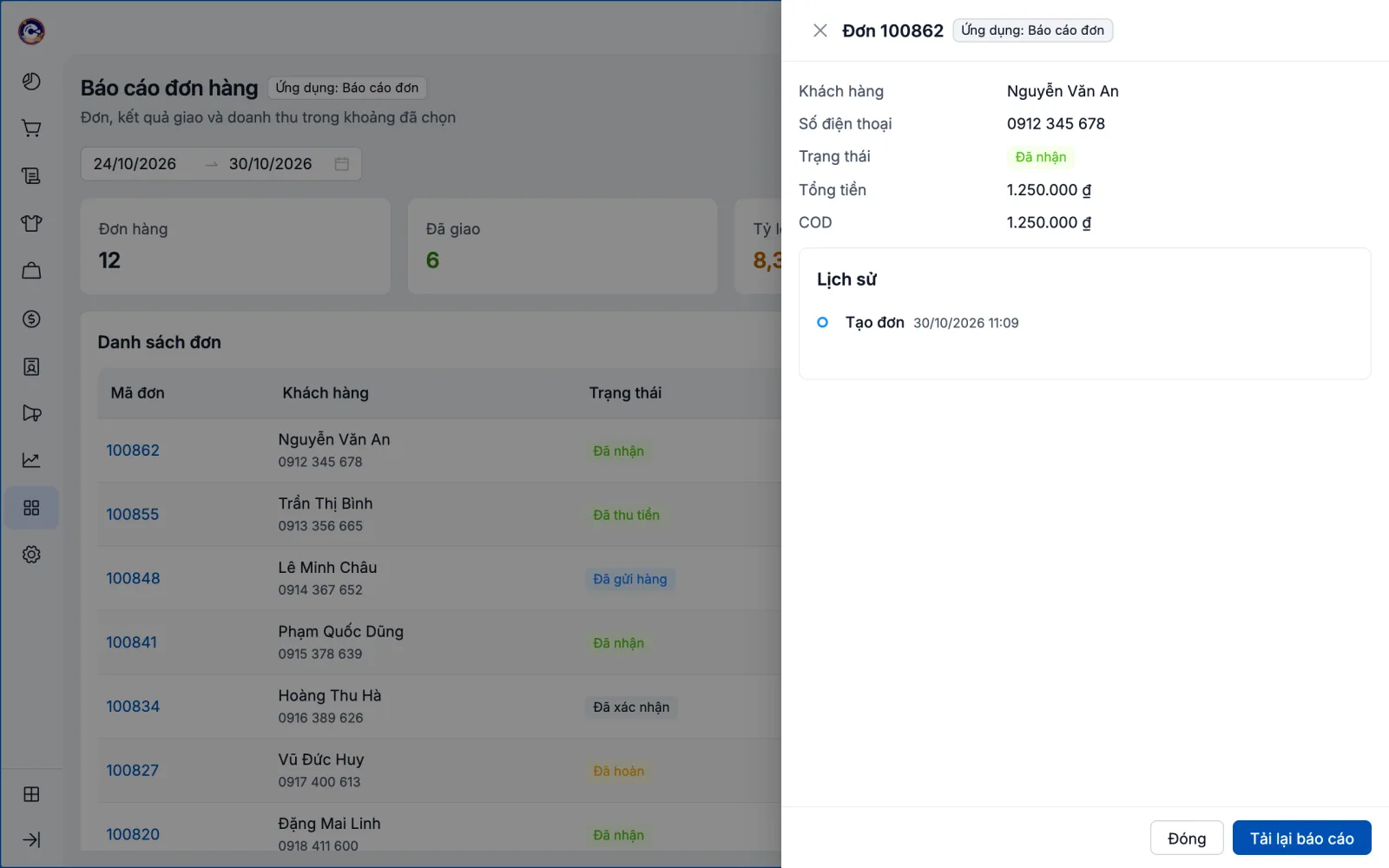
```tsx
// Trang đang mở: mở chính trang này ở /pick trong drawer của POS.
const picked = await pos.ui.drawer<{ id: number }>({ path: '/pick', title: 'Chọn sản phẩm', width: 'large' });
// Trang ở /pick: biết mình đang ở drawer, nút của PosPage nằm ở chân.
function Pick() {
const pos = usePos();
return (
pos.close({ id: selected })}>Chọn}>
…
);
}
const App = () => (usePos().data.presentation === 'drawer' ? : );
```
Trong modal/drawer, `PosPage` không có dòng tiêu đề (tiêu đề là `title` của `pos.ui.modal`), nút trong `actions` dính ở đáy như chân modal của POS; modal cao theo nội dung.
## Màu, chữ, Tailwind
Phần trang tự vẽ (HTML, CSS riêng) dùng token của POS thay vì mã màu tự chọn; `pos-app check` cảnh báo màu ngoài bảng màu POS.
```ts
import { tokens } from '@pancake-pos/ui';
tokens.color.primary; // '#0050B3'
tokens.color.bgLayout; // nền trang '#EAECF0'
tokens.chart; // màu biểu đồ theo thứ tự series
```
```css
@import '@pancake-pos/ui/tokens.css'; /* biến CSS --pos-color-*, --pos-space-*, --pos-radius-* */
.note { color: var(--pos-color-text-secondary); padding: var(--pos-space-md); }
```
- **Tailwind 4:** `@import "tailwindcss"; @import "@pancake-pos/ui/tailwind.css";` cho class `bg-pos-layout`, `text-pos-secondary`, `border-pos-border`, `rounded-pos-card`, `p-pos-lg`, `text-pos-body`.
- **Tailwind 3:** `import posPreset from '@pancake-pos/ui/tailwind-preset'`, thêm `presets: [posPreset]` vào `tailwind.config.js`.
- **Không dùng React:** `@pancake-pos/ui/fonts.css` (font Inter kèm gói) và `tokens.css`; kết nối POS bằng `connect()` (xem [Runtime API › Trang iframe](/developers/apps/runtime-api#trang-iframe)).
## Trang tự host mở ngoài POS
Trang tự host (`url`) có thể là web dùng riêng, mở thẳng trên trình duyệt. `PosProvider standalone` vẽ trang với cùng component và nền xám khi không có POS:
```tsx
function App() {
const pos = usePosOptional(); // null khi mở ngoài POS
…
}
```
`PosPage` ngoài POS tự vẽ dòng tiêu đề trong trang bằng cùng style. Cấu hình máy chủ (`frame-ancestors`, gửi app token về backend) xem [Trang tự host](/developers/apps/runtime-api#trang-tu-host). Ví dụ đầy đủ: `get_example` với `iframe-report` và `self-hosted` trong [MCP](/developers/apps/ai-guide#mcp).
## Kiểm tra
`pos-app check` và `npx eslint .` có [luật](/developers/apps/sdk#luat-kiem-tra-code) cho `page/`: cảnh báo thư viện UI khác (`@mui/*`, `@chakra-ui/*`, `bootstrap`…), màu ngoài bảng màu POS, tiền tự định dạng, file vào của trang không dùng `PosProvider`/`connect()`, `Modal`, `Drawer`, `Modal.confirm` của antd (dùng `PosModal`/`PosDrawer`, `pos.ui.*`); báo lỗi ``, `@import`, `@font-face` trỏ ra ngoài gói.